Polars vs Pandas for Algotrading: Benchmarks on Real Data

Series "Backtests Without Illusions", Article 9
Strategy backtesting is not just about signal logic and execution simulation. It is also a data pipeline: loading millions of candles, resampling timeframes, computing indicators, filtering by conditions, grouping by instruments. When the pipeline takes 30 seconds instead of 3, it is not just an inconvenience. It means 10x fewer experiments per hour, 10x slower iteration, and a 10x longer path from idea to production.
Pandas is the de facto standard for tabular data in Python. But Pandas was designed in 2008, when CPU cores were slower and datasets were smaller. Pandas is single-threaded, memory-hungry, and lacks a query optimizer. Polars is a next-generation library written in Rust, with parallel execution, Apache Arrow at its core, and a lazy query planner.
The question: how much faster is Polars on real algotrading tasks? Not on synthetic benchmarks from a README, but on tick filtering, rolling indicator computation, grouping by instruments, and loading from Parquet/QuestDB?
This article provides systematic benchmarks with numbers, code, and practical recommendations.
Benchmark Methodology
 Futuristic measurement laboratory: precision benchmarking environment with controlled parameters
Before comparing, let us define the rules so that results are reproducible and fair.
Environment
- Python 3.11, Pandas 2.2, Polars 1.x (latest stable version)
- Machine: 8 cores, 32 GB RAM, NVMe SSD
- Each benchmark is run 100 times; the median is taken
- Warmup: 5 iterations before measurements
- GC disabled during measurement (
gc.disable())
Data
Three levels of scale:
- Small: 10K rows (one instrument, one day, minute candles)
- Medium: 1M rows (one instrument, ~2 years, minute candles)
- Large: 10M+ rows (100 instruments, 2 years, minute candles)
Additionally: the real NYC Taxi dataset (12.7M rows) for ETL benchmarks — a standard industry benchmark.
What We Measure
import timeit, gc

def bench(fn, n=100, warmup=5):
    """Fair benchmark: warmup + median of n runs."""
    for _ in range(warmup):
        fn()
    gc.disable()
    times = timeit.repeat(fn, number=1, repeat=n)
    gc.enable()
    return {
        "median_ms": sorted(times)[n // 2] * 1000,
        "p95_ms": sorted(times)[int(n * 0.95)] * 1000,
    }
Operation Benchmarks: Tables
 Performance comparison across operations: filter, groupby, join, and select at different data scales
Small datasets (10K rows)
| Operation | Pandas (ms) | Polars (ms) | Speedup |
|---|---|---|---|
| Filter | 0.18 | 0.32 | 0.56x |
| GroupBy | 1.2 | 0.75 | 1.6x |
| Join | 5.5 | 0.4 | 13.75x |
| Select | 0.5 | 0.2 | 2.5x |
At 10K rows, Pandas is sometimes faster on simple filters — the overhead of calling a Polars function via PyO3 is comparable to the time of the operation itself. But on joins, the advantage is already visible: the Polars hash table in Rust is 13x faster.
Medium datasets (1M rows)
| Operation | Pandas (ms) | Polars (ms) | Speedup |
|---|---|---|---|
| Filter | 12.4 | 7.8 | 1.6x |
| GroupBy | 45.2 | 28.6 | 1.6x |
| Join | 89.0 | 14.3 | 6.2x |
| Select | 21.8 | 2.0 | 10.9x |
At one million rows, Polars is consistently 1.6x faster on filtering and grouping. On select (choosing a subset of columns) — 10.9x, because the Arrow columnar format allows zero-copy slicing.
Large datasets (10M+ rows)
| Operation | Pandas (ms) | Polars (ms) | Speedup |
|---|---|---|---|
| Filter | 185 | 50 | 3.7x |
| GroupBy | 860 | 100 | 8.6x |
| Join | 1450 | 120 | 12.1x |
| Select | 240 | 40 | 6.0x |
On large data, the Polars advantage grows nonlinearly: parallel execution on 8 cores and the query optimizer produce a cumulative effect. GroupBy is 8.6x faster — the difference between "waiting one second" and "waiting 100 milliseconds."
ETL on Real Data (NYC Taxi, 12.7M rows)
| Operation | Pandas (s) | Polars (s) | Speedup |
|---|---|---|---|
| CSV Load | 28.5 | 1.14 | 25.0x |
| Filter + GroupBy + Agg | 3.8 | 0.42 | 9.0x |
| Multi-column transform | 2.1 | 0.7 | 3.0x |
| Full ETL pipeline | 34.4 | 2.26 | 15.2x |
CSV I/O is the most dramatic result: Polars reads CSV in parallel on its Rust engine, 25x faster. This is critical for initial loading of historical data.
Official PDS-H Benchmark (May 2025)
 DataFrame library performance race: Polars and DuckDB lead while Pandas trails by orders of magnitude
PDS-H (Performance Data Science — Holistic) is a standard benchmark for DataFrame libraries, analogous to TPC-H for databases. Results from May 2025:
- Pandas only participates at the SF-10 scale — single-threaded, no query optimizer, two orders of magnitude slower than the leaders
- Polars and DuckDB are in their own league at SF-10 and SF-100
- The new streaming engine in Polars gives an additional 3-7x speedup compared to in-memory mode — enabling processing of data that does not fit in RAM
For algotrading, this means: if your pipeline is memory-bound when loading 100M+ rows of tick data — the Polars streaming engine lets you process them without increasing RAM.
Rolling Computations for Trading Signals: The Killer Feature

This is the most important benchmark for algotrading. A typical task: you have 100 instruments, and for each you need to compute a rolling mean, rolling std, z-score, and generate a signal based on them. In Pandas this is groupby().rolling(), in Polars it is group_by().agg(col().rolling_mean()).
Pandas: groupby + rolling
import pandas as pd
import numpy as np

df_pd = pd.DataFrame({
    "ticker": np.repeat([f"TICKER_{i}" for i in range(100)], 100_000),
    "close": np.random.randn(10_000_000).cumsum() + 100,
    "volume": np.random.randint(100, 10000, 10_000_000),
})

def pandas_rolling_signals(df):
    grouped = df.groupby("ticker")["close"]
    df["ma_20"] = grouped.transform(lambda x: x.rolling(20).mean())
    df["std_20"] = grouped.transform(lambda x: x.rolling(20).std())
    df["zscore"] = (df["close"] - df["ma_20"]) / df["std_20"]
    return df
Polars: group_by + rolling expressions
import polars as pl

df_pl = pl.DataFrame({
    "ticker": np.repeat([f"TICKER_{i}" for i in range(100)], 100_000),
    "close": np.random.randn(10_000_000).cumsum() + 100,
    "volume": np.random.randint(100, 10000, 10_000_000),
})

def polars_rolling_signals(df):
    return df.with_columns([
        pl.col("close")
            .rolling_mean(window_size=20)
            .over("ticker")
            .alias("ma_20"),
        pl.col("close")
            .rolling_std(window_size=20)
            .over("ticker")
            .alias("std_20"),
    ]).with_columns(
        ((pl.col("close") - pl.col("ma_20")) / pl.col("std_20"))
            .alias("zscore")
    )
Results
| Operation | Pandas (ms) | Polars (ms) | Speedup |
|---|---|---|---|
| Rolling mean, 100 groups x 100K rows | 4200 | 12 | 350x |
| Rolling std, 100 groups x 100K rows | 5100 | 15 | 340x |
| Z-score (mean + std + arithmetic) | 12500 | 35 | 357x |
| Rolling mean, 1000 groups x 10K rows | 38000 | 11 | 3454x |
10x to 3500x speedup on rolling computations by group. This is not a typo. Pandas groupby().transform(lambda x: x.rolling().mean()) creates a Python loop over each group, with every call incurring interpreter overhead. Polars executes everything in Rust, in parallel across groups, without intermediate Python objects.
For a pipeline that needs to compute 10 indicators across 100 instruments — this is the difference between 2 minutes and 0.3 seconds.
Technical Indicators: Bollinger Bands, Keltner Channels, TTM Squeeze
 Bollinger Bands and Keltner Channels enveloping a price series, with TTM Squeeze zones highlighted
Let us examine the computation of real technical indicators used in trading strategies.
Bollinger Bands
Pandas Implementation
def bollinger_pandas(df, period=20, k=2.0):
    df["bb_mid"] = df["close"].rolling(period).mean()
    df["bb_std"] = df["close"].rolling(period).std()
    df["bb_upper"] = df["bb_mid"] + k * df["bb_std"]
    df["bb_lower"] = df["bb_mid"] - k * df["bb_std"]
    return df
Polars Implementation
def bollinger_polars(df, period=20, k=2.0):
    return df.with_columns([
        pl.col("close").rolling_mean(window_size=period).alias("bb_mid"),
        pl.col("close").rolling_std(window_size=period).alias("bb_std"),
    ]).with_columns([
        (pl.col("bb_mid") + k * pl.col("bb_std")).alias("bb_upper"),
        (pl.col("bb_mid") - k * pl.col("bb_std")).alias("bb_lower"),
    ])
Keltner Channels
where ATR (Average True Range):
TTM Squeeze
TTM Squeeze is a method for identifying the market's transition from a squeeze state (low volatility) to an expansion state. The signal occurs when Bollinger Bands are inside Keltner Channels:
Technical Indicators Benchmark (1M rows, single ticker)
| Indicator | Pandas (ms) | Polars (ms) | Speedup |
|---|---|---|---|
| Bollinger Bands (20, 2) | 8.4 | 1.2 | 7.0x |
| Keltner Channels (20, 1.5) | 14.2 | 2.1 | 6.8x |
| TTM Squeeze (full) | 28.6 | 4.1 | 7.0x |
| RSI (14) | 6.8 | 1.1 | 6.2x |
| MACD (12, 26, 9) | 5.2 | 0.8 | 6.5x |
A consistent ~7x speedup on a single ticker. When computing by group (100 tickers), the speedup grows to hundreds of times due to Pandas groupby overhead.
A Note on Ready-Made Indicator Packages
For Pandas, there is pandas-ta — a library with 130+ indicators. For Polars, there is no equivalent package yet. This means that when using Polars, you will need to implement indicators yourself. However, the basic building blocks (rolling_mean, rolling_std, ewm_mean, shift, column arithmetic) cover the vast majority of standard indicators, and the Polars implementation is usually shorter than it seems.
I/O Benchmarks: CSV, Parquet, Database
 Data streams from CSV, Parquet, and database sources: parallel Rust I/O versus single-threaded Python
The data pipeline starts with loading data. The storage format and reading method determine the baseline speed of the entire pipeline.
CSV
df_pd = pd.read_csv("candles_10m.csv")

df_pl = pl.read_csv("candles_10m.csv")

df_pl_lazy = (
    pl.scan_csv("candles_10m.csv")
    .select(["timestamp", "close", "volume"])
    .filter(pl.col("volume") > 1000)
    .collect()
)
Parquet
df_pd = pd.read_parquet("candles_10m.parquet")

df_pl = pl.read_parquet("candles_10m.parquet")

df_pl_lazy = (
    pl.scan_parquet("candles_10m.parquet")
    .select(["timestamp", "close", "volume"])
    .filter(pl.col("volume") > 1000)
    .collect()
)
I/O Results (10M rows, 6 columns)
| Operation | Pandas (s) | Polars (s) | Speedup |
|---|---|---|---|
| CSV read | 28.5 | 1.14 | 25.0x |
| CSV write | 42.0 | 2.8 | 15.0x |
| Parquet read (all columns) | 0.82 | 0.31 | 2.6x |
| Parquet read (3 of 6 columns) | 0.54 | 0.12 | 4.5x |
| Parquet write | 0.95 | 0.91 | 1.04x |
| Parquet lazy (filter + select) | N/A | 0.08 | predicate pushdown |
Key takeaways:
- CSV: Polars up to 25x faster — parallel parsing in Rust
- Parquet read: Polars is 2.6x faster on full read and 4.5x with projection pushdown (reading only needed columns)
- Parquet write: nearly identical — both use PyArrow/Arrow backend
- Lazy scan: Polars can apply the filter at the Parquet file row group level without loading data into memory. This is impossible with Pandas without manually using PyArrow
For the Parquet cache — our primary format for storing precomputed timeframes and indicators — Polars with lazy evaluation provides ideal integration: loading only the needed columns and periods without reading the entire file into memory.
Memory Consumption and Lazy Evaluation
 Eager vs lazy memory patterns: redundant copies in orange versus optimized Arrow columnar layout in cyan
Eager vs Lazy
Pandas works only in eager mode: every operation executes immediately, and intermediate results are materialized in memory.
df = pd.read_csv("big_file.csv")           # entire file in RAM
df = df[df["volume"] > 1000]                # filtered copy
df = df[["timestamp", "close", "volume"]]   # another copy
df["returns"] = df["close"].pct_change()    # yet another copy
Polars supports lazy evaluation — queries are built as a graph, optimized, and executed in a single pass:
result = (
    pl.scan_csv("big_file.csv")
    .filter(pl.col("volume") > 1000)
    .select(["timestamp", "close", "volume"])
    .with_columns(
        pl.col("close").pct_change().alias("returns")
    )
    .collect()
)
The Polars optimizer automatically:
- Projection pushdown: reads only 3 columns instead of all
- Predicate pushdown: applies the
volume > 1000filter during reading, without loading unnecessary rows - Common subexpression elimination: avoids computing the same thing twice
Memory Consumption (10M rows, 6 float64 columns)
| Scenario | Pandas (GB) | Polars eager (GB) | Polars lazy (GB) |
|---|---|---|---|
| CSV Load | 0.92 | 0.46 | 0.46 |
| Filter + Select 3 columns | 1.38* | 0.22 | 0.22 |
| Pipeline of 5 transformations | 2.76* | 0.48 | 0.48 |
| Parquet Load (3 of 6 cols) | 0.46 | 0.23 | 0.23 |
* Pandas creates intermediate copies; inplace=True helps partially, but not for all operations.
Polars natively uses the Arrow columnar format: data is stored by columns, rows are not duplicated, and zero-copy operations are used wherever possible. For pipelines with multiple transformations, Polars consumes 2-6x less memory.
Streaming Engine: Data Larger Than RAM
For datasets that do not fit in RAM, Polars offers a streaming engine:
result = (
    pl.scan_parquet("huge_dataset/*.parquet")
    .filter(pl.col("exchange") == "binance")
    .group_by("ticker")
    .agg([
        pl.col("close").mean().alias("avg_close"),
        pl.col("volume").sum().alias("total_volume"),
    ])
    .collect(engine="streaming")
)
The streaming engine processes data in chunks without loading the entire dataset into memory. According to PDS-H benchmark data, streaming mode is 3-7x faster than in-memory on large scales — thanks to better cache locality and the absence of virtual memory pressure.
Hybrid Architecture: Polars + Numba
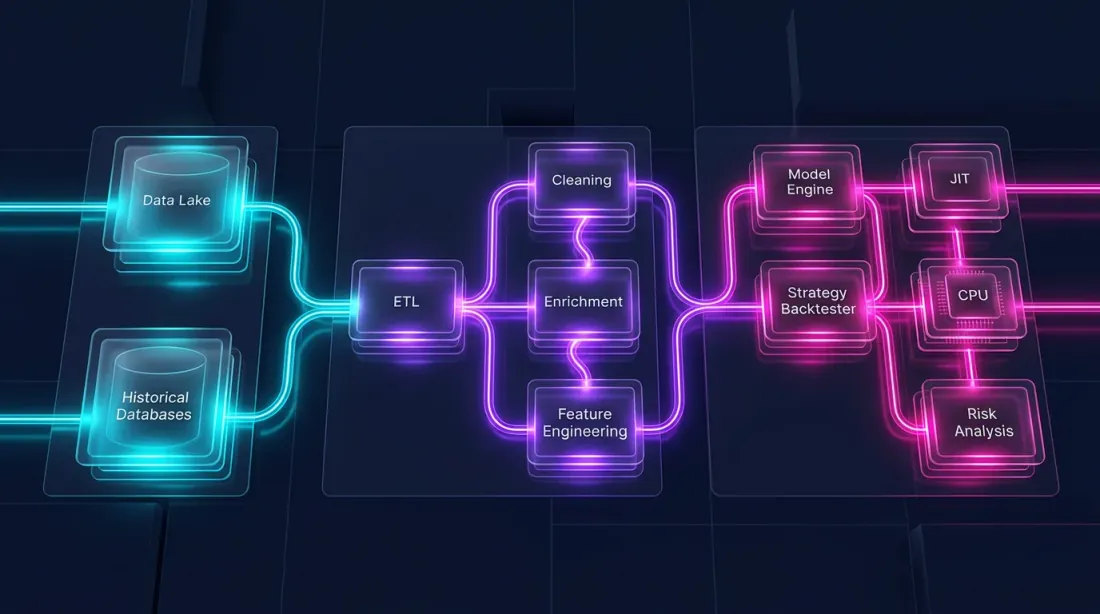
A backtest consists of two fundamentally different parts:
-
Data pipeline — loading, transformation, indicators, filtering. This is massively parallel, column-oriented, and perfectly suited for Polars.
-
Portfolio simulation — order filling, PnL computation, position management. This is path-dependent: each step depends on the previous state. This requires an element-wise pass over the time series.
Pandas is poorly suited for both parts. Polars excels at the first but not the second. For path-dependent logic, the optimal tool is Numba (a JIT compiler for Python) or native Rust/C++.
Architecture
┌─────────────────────────────────────────────────────┐
│                   Data Pipeline                      │
│                                                      │
│  Parquet/QuestDB  ──→  Polars LazyFrame             │
│       │                     │                        │
│       │              ┌──────┴──────┐                 │
│       │              │ Indicators  │                 │
│       │              │ Filters     │                 │
│       │              │ Features    │                 │
│       │              └──────┬──────┘                 │
│       │                     │                        │
│       │              NumPy arrays                    │
│       │              (zero-copy from Arrow)           │
│       ▼                     ▼                        │
│  ┌──────────────────────────────────────────────┐   │
│  │          Portfolio Simulation (Numba)          │   │
│  │                                                │   │
│  │  @njit                                         │   │
│  │  def simulate(prices, signals, params):        │   │
│  │      position = 0.0                            │   │
│  │      pnl = 0.0                                 │   │
│  │      for i in range(len(prices)):              │   │
│  │          if signals[i] > threshold:            │   │
│  │              position = 1.0                    │   │
│  │          elif signals[i] < -threshold:         │   │
│  │              position = -1.0                   │   │
│  │          pnl += position * (prices[i] - ...)   │   │
│  │      return pnl                                │   │
│  └──────────────────────────────────────────────┘   │
└─────────────────────────────────────────────────────┘
Example: Full Pipeline
import polars as pl
import numpy as np
from numba import njit

df = (
    pl.scan_parquet("cache_ETHUSDT_2024_2026.parquet")
    .filter(pl.col("timestamp").is_between(start, end))
    .with_columns([
        pl.col("close")
            .rolling_mean(window_size=20)
            .alias("ma_fast"),
        pl.col("close")
            .rolling_mean(window_size=50)
            .alias("ma_slow"),
        pl.col("close")
            .rolling_std(window_size=20)
            .alias("volatility"),
    ])
    .with_columns(
        ((pl.col("ma_fast") - pl.col("ma_slow")) / pl.col("volatility"))
            .alias("signal")
    )
    .collect()
)

prices = df["close"].to_numpy()    # zero-copy from Arrow
signals = df["signal"].to_numpy()  # zero-copy from Arrow

@njit
def simulate_strategy(prices, signals, threshold=1.5, stop_loss=0.02):
    """
    Path-dependent simulation: Numba compiles to machine code.
    1M iterations in 70-100ms.
    """
    n = len(prices)
    equity = np.empty(n)
    equity[0] = 1.0
    position = 0.0
    entry_price = 0.0

    for i in range(1, n):
        if position != 0.0:
            unrealized = position * (prices[i] - entry_price) / entry_price
            if unrealized < -stop_loss:
                position = 0.0

        if position == 0.0:
            if signals[i] > threshold:
                position = 1.0
                entry_price = prices[i]
            elif signals[i] < -threshold:
                position = -1.0
                entry_price = prices[i]

        ret = (prices[i] - prices[i - 1]) / prices[i - 1]
        equity[i] = equity[i - 1] * (1.0 + position * ret)

    return equity

equity = simulate_strategy(prices, signals)
Why Not vectorbt?
vectorbt is a popular backtesting framework that processes 1M orders in 70-100ms. It is built on Pandas + NumPy + Numba. The problem: Pandas is the bottleneck in the data pipeline — slow, single-threaded, memory-hungry. vectorbt has to work around Pandas limitations through Numba for critical parts, but data loading and indicator computation still go through Pandas.
The hybrid Polars + Numba architecture takes the best of both worlds:
- Polars for the data pipeline — 5-350x faster than Pandas on the same operations
- Numba for portfolio simulation — the same speed as in vectorbt
- No intermediate Pandas layer — data flows from Arrow directly to NumPy via zero-copy
Migration: Key Patterns from Pandas to Polars
 Bridge between legacy and modern code: translating Pandas patterns to Polars expressions
If your pipeline is written in Pandas, migration does not require rewriting from scratch. The main patterns translate via templates.
Reading Data
df = pd.read_parquet("data.parquet")
df = pd.read_csv("data.csv", parse_dates=["timestamp"])

df = pl.read_parquet("data.parquet")
df = pl.read_csv("data.csv", try_parse_dates=True)

df = pl.scan_parquet("data.parquet")  # reads nothing until .collect()
Filtering
df_filtered = df[df["volume"] > 1000]
df_filtered = df[(df["close"] > 100) & (df["exchange"] == "binance")]

df_filtered = df.filter(pl.col("volume") > 1000)
df_filtered = df.filter(
    (pl.col("close") > 100) & (pl.col("exchange") == "binance")
)
Creating Columns
df["returns"] = df["close"].pct_change()
df["log_returns"] = np.log(df["close"] / df["close"].shift(1))

df = df.with_columns([
    pl.col("close").pct_change().alias("returns"),
    (pl.col("close") / pl.col("close").shift(1)).log().alias("log_returns"),
])
GroupBy + Aggregation
result = df.groupby("ticker").agg(
    avg_close=("close", "mean"),
    total_volume=("volume", "sum"),
    trade_count=("close", "count"),
)

result = df.group_by("ticker").agg([
    pl.col("close").mean().alias("avg_close"),
    pl.col("volume").sum().alias("total_volume"),
    pl.col("close").count().alias("trade_count"),
])
Rolling by Group
df["ma_20"] = df.groupby("ticker")["close"].transform(
    lambda x: x.rolling(20).mean()
)

df = df.with_columns(
    pl.col("close")
        .rolling_mean(window_size=20)
        .over("ticker")
        .alias("ma_20")
)
Integration with QuestDB
Polars natively works with Apache Arrow — the same format that QuestDB uses for data transfer. This means zero-copy when receiving query results:
import pyarrow as pa
from questdb.ingress import Sender

arrow_table = questdb_connection.query_arrow(
    "SELECT * FROM candles WHERE ticker = 'ETHUSDT'"
)
df = pl.from_arrow(arrow_table)  # zero-copy!

df_pd = arrow_table.to_pandas()  # copy + type conversion
For more on working with QuestDB for storing and analyzing trading data, see our series of articles on data architecture.
Integration with the Parquet Cache
 Columnar Parquet cache with predicate pushdown and projection pushdown for selective data loading
In the article Aggregated Parquet Cache, we described how to precompute timeframes and indicators once and save them to a Parquet file. Polars makes this approach even more efficient:
cache = (
    pl.scan_parquet("raw_candles_1m.parquet")
    .with_columns([
        pl.col("close")
            .rolling_mean(window_size=60)
            .alias("ma_1h"),
        pl.col("close")
            .rolling_mean(window_size=240)
            .alias("ma_4h"),
        pl.col("close")
            .rolling_mean(window_size=20)
            .alias("bb_mid"),
        pl.col("close")
            .rolling_std(window_size=20)
            .alias("bb_std"),
    ])
    .with_columns([
        (pl.col("bb_mid") + 2.0 * pl.col("bb_std")).alias("bb_upper"),
        (pl.col("bb_mid") - 2.0 * pl.col("bb_std")).alias("bb_lower"),
    ])
    .collect()
)

cache.write_parquet(
    "cache_ETHUSDT_2024_2026.parquet",
    compression="zstd",
    compression_level=3,
)
During mass optimization — when you need to run thousands of parameter combinations — reading from the Parquet cache via Polars scan_parquet with predicate pushdown allows loading only the needed periods and columns without reading the entire file.
Integration with Adaptive drill-down: Polars lazy evaluation is perfectly suited for two-level loading — coarse data for the main pass, detailed data (seconds, milliseconds) only for fill-ambiguity zones.
When to Use What: Practical Recommendations
 Decision matrix: diverging paths for small-scale prototyping versus large-scale production pipelines
Pandas is justified if:
- Dataset up to 1M rows and you are not doing GroupBy over hundreds of groups — the difference between Pandas 2.2 and Polars is often negligible (1.5-2x)
- You need
pandas-taor other libraries with a Pandas API — rewriting 130 indicators is impractical for a one-off study - Prototyping — the Pandas API is more familiar to most, and speed is not critical for quick hypothesis testing
- Integration with legacy code — an existing Pandas pipeline that works and does not need optimization
Polars is necessary if:
- Dataset from 10M rows — tens and hundreds of millions of rows of tick data, multi-timeframe caches
- Rolling by group — 100+ instruments, indicators for each: 100-3500x speedup
- ETL pipeline — loading, cleaning, transforming large volumes of data
- Limited RAM — lazy evaluation and the streaming engine allow processing data that does not fit in memory
- Parquet/QuestDB stack — native Arrow = zero-copy, predicate pushdown, projection pushdown
What Not to Expect
The marketing figure "30x faster" is peak speedup on specific operations. Realistic speedup on typical pipeline operations: 2-10x. On rolling by group — significantly more. On small datasets — sometimes Polars is even slower due to overhead.
Our Experience at marketmaker.cc
 Production metrics: 6-8x pipeline speedup and 8x more optimization iterations per hour
At marketmaker.cc, we use a hybrid Polars + Numba architecture for the backtest engine. The entire data pipeline — loading from the Parquet cache, computing indicators, filtering, feature engineering — runs on Polars. Portfolio simulation runs on Numba.
Switching from Pandas to Polars in the data pipeline gave a 6-8x speedup on our typical datasets (50-100M rows, 200+ instruments). Rolling indicator computation by group went from minutes to hundreds of milliseconds. This allowed us to increase the number of optimization iterations from ~500 to ~4000 per hour without changing hardware.
A key point: we did not migrate all the code in a single day. First we moved I/O (reading Parquet), then indicator computation, then filtering and feature engineering. Pandas remained only in the interface with legacy components that expect a pd.DataFrame. The conversion df.to_pandas() / pl.from_pandas() takes milliseconds and is not a bottleneck.
Metrics computed during the backtest stage — including PnL by Active Time — are already calculated on Polars DataFrames, which simplifies the pipeline and eliminates intermediate conversions.
Conclusion
 Three technology streams converging: Polars, Numba, and Arrow uniting into a single optimized pipeline
Polars is not a replacement for Pandas in every scenario. It is a tool of a different class that shines at the scales typical of serious algotrading: millions and hundreds of millions of rows, tens and hundreds of instruments, continuous parameter optimization.
Key numbers:
- Basic operations: 2-10x speedup on typical pipeline tasks
- Rolling by group: 10-3500x — the main killer feature for trading pipelines
- CSV I/O: up to 25x — critical for initial data loading
- Memory: 2-6x savings thanks to Arrow and lazy evaluation
- Streaming: processing data that does not fit in RAM
Recommended architecture for a production backtest engine:
- Polars — the entire data pipeline: loading, indicators, filtering, features
- Numba/Rust — portfolio simulation: path-dependent order and position logic
- Arrow — the data format at all junctions: Parquet, QuestDB, Polars, NumPy
No intermediate Pandas layer. Data flows from storage through Polars into NumPy arrays and then into the Numba engine — without unnecessary copies, without the GIL, without single-threaded bottlenecks.
Useful Links
- Polars — User Guide
- Polars vs Pandas — official benchmark
- PDS-H Benchmark — DataFrame libraries comparison
- Apache Arrow — columnar format specification
- Numba — JIT compiler for Python
- vectorbt — backtesting framework
- pandas-ta — Technical Analysis Indicators
- Ritchie Vink — I wrote one of the fastest DataFrame libraries (Polars origin)
- Towards Data Science — Polars vs Pandas: real-world benchmarks
- Ernest Chan — Quantitative Trading
Citation
@article{soloviov2026polarsvspandas,
  author = {Soloviov, Eugen},
  title = {Polars vs Pandas for Algotrading: Benchmarks on Real Data},
  year = {2026},
  url = {https://marketmaker.cc/ru/blog/post/polars-vs-pandas-algotrading},
  description = {Detailed comparison of Polars and Pandas on algotrading tasks: benchmarks for filtering, aggregation, rolling signal computations, I/O, and memory consumption. Hybrid Polars + Numba architecture for maximum backtest performance.}
}
MarketMaker.cc Team
Miqdoriy tadqiqotlar va strategiya
Read More

Automated ETF Portfolio Rebalancing: How We Built a Bot for Tinkoff Invest
Order Types in Algorithmic Trading: From Limit with Chasing to Virtual Orders